DevOps & Cloud Computing
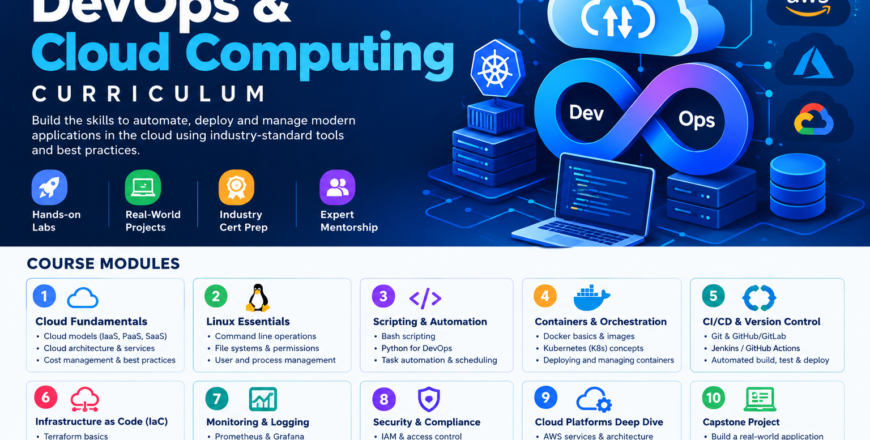
DevOps & Cloud Computing course combines hands-on labs and real-world projects to prepare learners for careers in DevOps engineering and cloud computing.

Instructor
Admin
Category
- Description
- Curriculum
- Reviews
- Grade
The DevOps & Cloud Computing Course equips learners with practical skills to build, deploy, automate, and manage modern applications in the cloud.
Covering cloud fundamentals, Linux, scripting and automation, containerization, CI/CD, Infrastructure as Code, monitoring, security, and major cloud platforms such as AWS, Microsoft Azure, and Google Cloud, the course combines hands-on labs and real-world projects to prepare learners for careers in DevOps engineering and cloud computing.
Total Duration: 24 weeks (6 month)
Module 1:Introduction to DevOps & Cloud Computing
-
1
 Module One: Introduction to DevOps & Cloud Computing
 -
2
Week 1: Devops/Cloud Computing
-
3
Week 1.1: What is DevOps
-
4
 DevOps Week 1 Assessment
 -
5
 DevOps Week 1 Assignment
 -
6
DevOps Further Study
-
7
Week 1: Outro
-
8
Week 2: Linux Fundamentals 1
-
9
Week 2.1: Operating Systems (OS) & Virtualization
-
10
Week 2.2: What is Linux ?
-
11
Week 2.4: Linux Fundamentals II
-
12
OS & Virtualization Assessment
-
13
OS & Virtualization Assignment
-
14
Week 2 Further Study
-
15
Week 2: Outro
Module 2: Networking & Version Control
-
16
Module Two: Networking & Version Control
-
17
Week 3 Intro: Git & GitHub
-
18
Week 3.1: What is Version Control?
-
19
Git & GitHub Assessment
-
20
Git & Version Control Assignment
-
21
Week 3: Futher Study
-
22
Week 3 : Outro
-
23
Week 4 Intro: Networking Basics
-
24
Week 4.1: What is Networking?
-
25
Week 4.2: OSI Model (7 Layers)
-
26
Week 4.3: DNS, DHCP & NAT Basics
-
27
Networking Basics Assessment
-
28
Week 4 Assignment
-
29
Week 4 Further Study
-
30
Week 4: Outro
Module 3: AWS Fundamentals & Networking
-
31
Module 3: AWS Fundamentals & Networking
-
32
Week 5 Intro: AWS BASICS
-
33
Week 5.1: What is AWS
-
34
Week 5.2: AWS Shared Responsibility Model
-
35
Week 5.3: AWS Global Infrastructure
-
36
Week 5.4: IAM (Identity and Access Management)
-
37
Week 5.5: S3 (Simple Storage Service)
-
38
Week 5.6: S3 vs EBS vs EFS
-
39
Week 5: Quiz
-
40
Week 5: Assignment
-
41
Week 5: Further Study
-
42
Week 5: Outro
-
43
Week 6 Intro: AWS EC2, S3 & Security Groups
-
44
Week 6.1: EC2 (Elastic Compute Cloud)
-
45
Week 6.2:Step-by-Step Launch Process
-
46
Week 6.3:Key Pairs & SSH Access
-
47
Week 6: Quiz
-
48
Week 6: Assignment
-
49
Week 6:Further Study
-
50
Week 6:Outro
-
51
Week 7 Intro:AWS Networking (VPC, Subnets & Load Balancers)
-
52
Week 7.1:VPC (Virtual Private Cloud)
-
53
Week 7.2:Default VPC vs Custom VPC
-
54
Week 7.3:NACLs vs Security Groups
-
55
Week 7.4 Network Flow and Troubleshooting
-
56
Week 7.5 Load Balancers
-
57
Week 7.6 Basic Load Balancer Architecture
-
58
Week 7 Quiz
-
59
Week 7 Practical Assignment
-
60
Week 7: Additional Resources
-
61
Week 7: Outro
-
62
Week 8 Intro: Week 8: AWS Auto Scaling & Elasticity - Learning Guide
-
63
Week 8 Intro: AWS Auto Scaling & Elasticity - Learning Guide
-
64
Week.1: AWS Auto Scaling & Elasticity
-
65
Week 8.2: Auto Scaling Groups (ASGs)
-
66
Week 8.3: Health Checks & Traffic Routing
-
67
Week 8.4: CloudWatch Metrics
-
68
Week 8.5: Production Checklist
-
69
Week 8 Quiz
-
70
Week 8 Assignment
-
71
Week 6: Futher Study
-
72
Week 8: Outro
Module 4: Infrastructure as Code (IaC)
-
73
Module 4: Infrastructure as Code (IaC)
-
74
Week 9.1: Ansible Basics + Ansible + AWS Project
-
75
Week 9.2: Introduction to Configuration Management
-
76
Week 9.3: Ansible Fundamentals
-
77
Week 9.4: Ansible Galaxy
-
78
Week 9.5: AWS Integration with Ansible
-
79
Week 9 Quiz
-
80
Week 9 Assignment
-
81
Week 9 Further Study
-
82
Week 9 Outro
-
83
WEEK 10: TERRAFORM BASICS
-
84
Week 10.1: Introduction to Terraform
-
85
Week 10.2: Terraform Workflow/ Lifecycle
-
86
Week 10.3: Terraform Core Concepts
-
87
Week 10 Quiz
-
88
Week 10 Assignment
-
89
Week 10: Further Study
-
90
Week 10 : Outro
-
91
Week 11: Terraform Advanced
-
92
Week 11.1: Advanced Terraform Concepts
-
93
Week 11.2: Remote State Management
-
94
Week 11.3: Workspaces (dev, staging, prod)
-
95
Week 11 Quiz
-
96
Week 11: Assignment
-
97
Week 11: Further Study
-
98
Week 11: Outro
-
99
Week 12: Terraform + Ansible Integration
-
100
Week 12.1: Terraform + Ansible Integration
-
101
Week 12.2: The Core Principle: Separation of Concerns
-
102
Week 12.3: How the Tools Work Together (Real Workflow)
-
103
Week 12 QuizScenario-Based Questions & Answers
-
104
Week 12 Assignment
-
105
Week 12: Further Study
-
106
Week 12: Outro
Module 5: Containerization and Kubernetes
-
107
Module Five: Containerization and Kubernetes
-
108
Week 13: Intro
-
109
Week 13.1: Understanding the Concept of Containers
-
110
Week 13.2: Containers vs Virtual Machines
-
111
Week 13.3: Dockerfile Basics
-
112
Week 13 Quiz
-
113
Week 13 Assignment
-
114
Wek13: Further Study
-
115
Week 13: Outro
-
116
Week 14: WEEK 14: DOCKER COMPOSE
-
117
Week 14.1: INTRODUCTION TO DOCKER COMPOSE
-
118
Week 14.2: YAML CONFIGURATION BASICS
-
119
Week 14.3: Services, Networks, And Volumes
-
120
Week 14.4: MULTI-CONTAINER APPLICATIONS
-
121
Week 14 Quiz
-
122
Week 14 Assignment
-
123
Week 14: Further Study
-
124
Week 14: Outro
-
125
Week 15: Using AWS ECR & ECS for Container Image Management and Deployment
-
126
Week 15.1: AWS Elastic Container Registry (ECR)
-
127
Week 15.2: How Amazon Elastic Container Registry (ECR) Works
-
128
Week 15.3: Pushing and Pulling Container Images
-
129
Week 15.4: AWS Elastic Container Service (ECS)(Page 4) What is ECS (Elastic Container Service)? Amazon ECS Explained | Introduction to AWS ECS & Core Concepts (Full Overview) | #01 Day-21 | AWS ECS | ECS vs EKS vs Kubernetes | Free AWS job ready course| #devops #abhishekveeramalla ECS, EKS, Fargste, ECR: Containers on AWS Amazon Elastic Container Service (ECS) is a fully managed container orchestration service provided by Amazon Web Services that helps you run, manage, and scale containerized applications easily. Containers usually run applications packaged with all dependencies using tools like Docker. Instead of manually managing servers and containers, ECS automatically handles: Container deployment Scaling containers up or down Load balancing Monitoring Infrastructure management It is commonly used to run microservices, web applications, APIs, and batch jobs. Why ECS is Used Developers use ECS because it helps: Run applications in containers Automatically scale applications Reduce infrastructure management Integrate easily with other AWS services Improve reliability and availability Example: A company can run multiple microservices (login service, payment service, product service) each in separate containers using ECS. Core Components of ECS Architecture ECS architecture contains several building blocks. Main ECS Components Cluster Task Definition Task Service Container Container Instance Launch Types Load Balancer Let’s understand each one. 1. ECS Cluster Amazon ECS Cluster | AWS ECS Tutorial | Hands-On Step-by-Step Guide | #02 GitHub - https://github.com/Learn-It-Right-Way... Branch - main PLEASE REFER README SECTION FOR NECESSARY COMMANDS. A Cluster is a logical group of computing resources where containers run. It can contain: Virtual machines (EC2 instances) Serverless compute (Fargate) Clusters help organize and manage applications. 2. Task Definition Amazon ECS Task Definition | AWS ECS Tutorial | Hands-On Step-by-Step Guide | #03 A Task Definition is like a blueprint that describes how containers should run. It defines: Docker image CPU and memory Ports Environment variables Logging Networking Example (concept): Task Definition - Container Image: nginx - CPU: 512 - Memory: 1GB - Port: 80 3. Task Amazon ECS Task | AWS ECS Tutorial | Hands-On Step-by-Step Guide | #04 A Task is a running instance of a task definition. Think of it like: Task Definition → Template Task → Running container Example: If task definition says run 1 nginx container, when executed it becomes a task. 4. Container A container is the smallest unit that runs the application. It includes: Application code Runtime Dependencies Libraries Example container images: nginx node.js app python API Containers are usually created using Docker images. 5. ECS Service Amazon ECS Service | AWS ECS Tutorial | Hands-On Step-by-Step Guide | #05 A Service makes sure that a certain number of tasks are continually active and running. Example: If you set: Desired Tasks = 3 ECS ensures: Task 1 Task 2 Task 3 If one crashes, ECS automatically replaces it. Services are used for: Web apps APIs Long-running applications 6. Container Instance (EC2 Mode) An EC2 server registered to the ECS cluster is a container instance when utilizing the EC2 launch type. ECS Launch Types ECS provides two main launch types. 1. EC2 Launch Type You manage servers. Uses: Amazon EC2 Responsibilities: Manage instances Patch OS Configure scaling Good for more control. 2. Fargate Launch Type Amazon ECS Fargate | AWS ECS Tutorial | Deploy Tasks & Services | Hands-On Step-by-Step Guide | #06 Serverless container execution using AWS Fargate. You do NOT manage servers. Advantages: No infrastructure management Automatic scaling Pay only for resources used Good for simple deployment. ECS Networking Architecture ECS integrates with: Amazon Virtual Private Cloud (VPC) Security Groups Subnets Load Balancers Each container can get: Private IP Security rules Network isolation ECS with Load Balancer Amazon ECS Load Balancing | Application Load Balancer (ALB) Basics | AWS ECS Tutorial | #07 Amazon ECS Load Balancing | ALB Integration with Fargate Launch Type | Hands-On AWS Tutorial | #09 For web applications ECS usually integrates with: Benefits: Traffic distribution High availability Automatic failover ECS Auto Scaling https://aws.amazon.com/video/watch/52bf5a22b77/ ECS supports automatic scaling based on: CPU usage Memory usage Network traffic Example: If CPU > 70% Add more containers If CPU 70% add containers If CPU < 30% remove containers This helps the application handle traffic spikes automatically. Detailed ECS Architecture Amazon ECR + ECS Integration | Deploy a Docker Image from ECR to ECS | Hands-On AWS Tutorial | #03 Benefits of Using ECS and ECR (Page 5) Using ECS and ECR together provides a number of benefits, including: Simplified Container Management ECS and ECR provide a fully managed container management solution that makes it easy to run, scale, and manage Docker containers in the cloud. High Availability and Durability ECS and ECR are designed for high availability and durability, with automatic replication across multiple Availability Zones. Integrated Security ECS and ECR integrate with AWS IAM to provide secure access control for Docker images and containers. Scalability and Performance ECS and ECR provide auto scaling, load balancing, and other features that make it easy to scale containers to meet demand and ensure high performance. Integration with Other AWS Services ECS and ECR integrate with a wide range of other AWS services, making it easy to build and deploy containerized applications using a complete AWS stack. Cost Savings Using ECS and ECR can help you save costs compared to running containers on your own infrastructure. ECS and ECR offer a pay-as-you-go pricing model that only charges you for the resources you use
-
130
Week 15.5: Benefits of Using ECS and ECR
-
131
Week 15 Quiz
-
132
Week 15 Assignment
-
133
Week 15: Further Study
-
134
Week 15: Outro
-
135
Week 16: Kubernetes Fundamentals
-
136
Week 16.1: Introduction to Kubernetes
-
137
Week 16.2: Kubernetes Basic Resources
-
138
Week 16.3: Kubernetes Architecture
-
139
Week 16.4: Kubernetes Installation
-
140
Week 16: Quiz
-
141
Week 16: Assignment
-
142
Week 16: Further Study
-
143
Week 16: Outro
-
144
Week 17: Advanced Kubernetes
-
145
content
-
146
Week 17: Quiz
-
147
Week 17: Assignment
-
148
Week 17: Further Study
-
149
Week 17: Outro
-
150
Week 18: Hand-On Project (Con’t….)
Module 6: CI/CD, Monitoring, Logging & Cloud Security
-
151
Module Six: CI/CD, Monitoring, Logging & Cloud Security
-
152
Week 19: CI/CD – GitHub Actions & Jenkins
-
153
Week 19.1: Introduction to CI/CD
-
154
Week 19.2: Introduction to GitHub Actions
-
155
Week 19.3: Core Actions & Marketplace Usage
-
156
Week 19.4: Introduction to Jenkins
-
157
Week 19: Quiz
-
158
Week 19: Assignment
-
159
Week 19: Further Study
-
160
Week 19: Conclusion
-
161
Week 20: Metrics, Observability & Alerts
-
162
Week 20.1: Introduction to Monitoring
-
163
Week 20.2: Introduction to CloudWatch(Page 2) Day-16 | DEEP DIVE INTO AWS CLOUD What is CloudWatch? Amazon CloudWatch is a monitoring and observability service that collects, tracks, and visualizes system data (metrics, logs, and events) in real time. Core Functionality CloudWatch enables you to: Monitor AWS resources (EC2, RDS, Lambda, ECS, etc.) Track system performance over time Visualize infrastructure and application health Detect anomalies Trigger alerts and automated responses Real-World Analogy CloudWatch is like a mission control center: Metrics → Sensors Dashboards → Screens Alarms → Emergency alerts Why CloudWatch Matters in DevOps Centralized Monitoring All system data is aggregated into one platform instead of checking services individually. Real-Time Visibility Engineers can see system health instantly and respond faster. Automated Alerting Issues are detected and reported without human intervention. Operational Efficiency Reduces manual monitoring and enables proactive system management. CloudWatch Core Components CloudWatch is built on three main pillars: 1. Metrics Metrics are time-series numerical data points that represent system performance. Examples CPUUtilization NetworkIn / NetworkOut DiskReadOps RequestCount Characteristics Collected at regular intervals Stored over time Can be aggregated (average, max, min) Example Time CPU Usage 10:00 30% 10:05 55% 10:10 80% Types of Metrics Default Metrics → Provided automatically by AWS Custom Metrics → Defined by users (e.g., app-specific data) Why Metrics Matter Identify performance trends Detect abnormal behavior Enable alerting 2. Logs CloudWatch Logs store detailed records of system and application activity. Sources EC2 instances Lambda functions Application logs System logs Example 2026-03-25 10:15:23 ERROR Database connection failed Use Cases Debugging errors Auditing system behavior Root cause analysis Insight Metrics tell you something is wrong Logs tell you why it is wrong 3. Dashboards Dashboards are visual representations of metrics and logs. Features Graphs and charts Real-time updates Custom widgets Multi-resource visibility Use Cases System health monitoring Performance reporting Operational visibility 4. Alarms Alarms are rules that monitor metrics and trigger actions when thresholds are exceeded. How It Works Select metric (e.g., CPU) Define threshold (e.g., > 80%) Evaluate over time Trigger action if condition is met Alarm States OK ALARM INSUFFICIENT_DATA Actions Send notifications Trigger auto-scaling Invoke Lambda Restart/stop instances Example CPU > 80% for 5 minutes → Alarm triggered → Notification sent SNS Integration Amazon Simple Notification Service is used to send notifications. Workflow Alarm triggers CloudWatch sends message to SNS SNS delivers: Email SMS Webhook CloudWatch Architecture Amazon CloudTrail (Page 3) AWS CloudTrail - Part 1 - Definition and Creation of CloudTrail AWS CloudTrail - Part 2 - Pushing CloudTrail Logs to CloudWatch Logs & Creating Alarms | DEMO AWS CloudTrail - Part 3 - Compliance, Correlation with Config, Event details, CloudTrail Logs AWS CloudTrail - Part 4 - How To Move CloudTrail Logs from multiple accounts to one S3 Bucket AWS CloudTrail - Part 5 - How To Achieve CloudTrail Logs Integrity Validation AWS CloudTrail - Part 6 - Organization Trail | Enterprise level Security setup | Logs access by SIEM What is CloudTrail? Amazon CloudTrail records all API activity and user actions in AWS. What CloudTrail Does CloudTrail answers: “Who did what, when, and where?” Tracking API Activity Every AWS action is an API call: Launch EC2 Delete S3 bucket Modify IAM role Update security group CloudTrail records all these actions. Example Event User: Admin Action: DeleteInstance Resource: EC2 Time: 10:32 AM Use Cases Incident investigation Change tracking Security monitoring Compliance auditing Analogy CloudTrail is like a security camera system: Records all activity Enables playback and investigation CloudWatch vs CloudTrail AWS Cloudwatch vs Cloudtrail - Whats the Difference? Feature CloudWatch CloudTrail Purpose Performance monitoring Activity auditing Data Metrics, logs API events Focus System health User actions Use Case Alerts & dashboards Security & compliance Introduction to Prometheus (Page 4) Day-1 | Fundamentals of Observability | Observability Zero to Hero Course GitHub Repo for the Course https://github.com/iam-veeramalla/obs... Day-2 | Basics of Prometheus Day-3 | Best Prometheus Explanation | Practical Hands on demonstration Day-4 | Custom Metrics Instrumentation and Scraping using Prom Client | Send Custom Alerts to Email Day-5 | Logging with EFK Stack Day-6 | Demo on How To Distribute Tracing with Jaeger What is Prometheus? Prometheus is an open-source monitoring and alerting system designed to collect and store time-series metrics. It is widely used in: Kubernetes environments Microservices architectures Cloud-native systems Key Features Pull-based metrics collection Built-in time-series database Powerful query language (PromQL) Alerting via Alertmanager Service discovery (Kubernetes, EC2, etc.) How Prometheus Works Application → Exposes Metrics (/metrics endpoint) ↓ Prometheus Server (pulls data) ↓ Time-Series Database ↓ PromQL Queries ↓ Alertmanager (alerts) Key Concept: Pull Model Prometheus uses a pull-based approach: It periodically scrapes metrics from applications Example: every 15 seconds Example Metrics http_requests_total 1200 cpu_usage 75 memory_usage 60 Strengths Highly flexible and customizable Ideal for Kubernetes and microservices Powerful querying with PromQL Open-source with strong community Limitations No built-in advanced visualization Requires setup and maintenance Limited long-term storage (without extensions) Introduction to Grafana What is Observability? | Grafana for Beginners Ep. 1 What is DevOps? | Grafana for Beginners Ep.2 Grafana, DevOps and Observability | Ep.3 Demo on downloading and running Grafana on your MacOS | Ep.4 Set up a new Grafana Cloud Account | Grafana for Beginners Ep. 5 Adding data sources to Grafana (Loki, Tempo, & Mimir) | Grafana for Beginners Ep. 6 Exploring logs, metrics, and traces with Grafana | Grafana for Beginners Ep. 7 Grafana's Most Frequently used visualizations | Ep. 8 Creating visualizations with Grafana | Grafana for Beginners Ep. 9 Annotating Events with Grafana | Grafana for Beginners Ep. 10 Creating alerts with Grafana | Grafana for Beginners Ep 11 Managing users and Permissions in Grafana | Grafana for Beginners Ep 12 What is Grafana? Grafana is an open-source visualization tool used to create dashboards from multiple data sources. Key Features Rich dashboards (graphs, charts, heatmaps) Real-time visualization Multiple data source support Built-in alerting Customizable UI Use Cases Monitoring CPU usage Tracking API latency Visualizing error rates Business analytics dashboards Strengths Beautiful and interactive dashboards Supports multiple data sources Easy to use and highly customizable Limitations Does NOT collect or store data Depends on tools like Prometheus Real-World Analogy Grafana is like a control room screen: Displays system health Helps engineers quickly understand what’s happening Prometheus + Grafana Architecture End-to-End Flow Application generates metrics Prometheus scrapes metrics Metrics stored in time-series database Grafana queries Prometheus Dashboards display insights Alerts notify engineers Key Insight Tool Role Prometheus Data collection & storage Grafana Visualization & dashboards Prometheus vs Grafana Feature Prometheus Grafana Type Monitoring system Visualization tool Role Collects & stores metrics Displays data Data Storage Yes No Query Language PromQL Uses data source queries Alerting Yes (Alertmanager) Yes Data Sources Internal Multiple Use Case Metrics monitoring Dashboards Prometheus vs CloudWatch Feature Prometheus CloudWatch Type Open-source Managed AWS service Setup Manual Fully managed Cost Free (infra cost) Pay-as-you-use Flexibility High AWS-limited Integration Multi-cloud AWS-native Scaling Self-managed Auto-scaled Grafana vs CloudWatch Dashboards Feature Grafana CloudWatch Flexibility Very high Moderate UI/Design Advanced Basic Data Sources Multiple AWS-only Customization Extensive Limited When to Use What Use CloudWatch When: You are fully on AWS You want minimal setup You prefer managed services You don’t want infrastructure overhead Use Prometheus + Grafana When: You use Kubernetes or microservices You need advanced customization You operate in multi-cloud environments You want full control over monitoring
-
164
Week 20.3: Amazon CloudTrail
-
165
Week 20.4: Introduction to Prometheus
-
166
Week 20: Quiz
-
167
Week 20: Assignment
-
168
Week 20: Further Study
-
169
Week 20: Outro
-
170
WEEK 21: REVISION
Module 7: Capstone Project
-
171
Capstone Project Overview
-
172
Project(i): InnovateMart's Inaugural EKS Deployment
-
173
Project(ii): Zomato Clone – Containerization & Orchestration
-
174
Project (iii): Cloud-Native Book Review Application on AWS
-
175
Project (iv):TaskApp Production Deployment on AWS
-
176
Project (v): RetroGames Super Mario EKS Deployment
Module 8: Career
Practice Questions
Please, login to leave a review



Course details
Duration
6 Months
Lectures
140
Assignments
24
Quizzes
19
Level
Beginner
Course requirements
Format: Weekly Lessons, Hand-on Practice, Assignment, Project.
Intended audience
Targeted Audiences: Complete beginners — Intermediate learners, No prior DevOps or Cloud experience required
Popular courses